A portfolio that proves itself. The site already existed - this is the rebuild: everything redrawn in Figma at three breakpoints and written from scratch in HTML, CSS and JavaScript, with no framework. The benchmark was WCAG 2.2 AA and the OWASP Top 10 categories that genuinely apply to a static site.
ROLESole designer and developer
DURATIONTwo months, 2026
STACKFigma, HTML, CSS, JavaScript
STATUSLive - you are using it right now
edijs.eu
1440px / desktop
834px / tablet
390px / mobile
PROJECT OVERVIEW
THE PROBLEM
Process is the part of a portfolio that is easiest to claim and hardest to prove. A screenshot does not show why the button sits where it does, or what was tried before it.
THE GOAL
Build a portfolio that is itself the work under review. If the site is designed, written from scratch, bilingual, accessible and fast, the claim is already proven before anyone opens the first case study.
MY ROLE
Everything, alone: information architecture, the full design in Figma, all three breakpoints, the code, the Latvian and English content, and the accessibility and security work.
14pages, in two languages
44design tokens
3breakpoints
10klines of CSS, no framework
THE SITE THIS REPLACED
edijs.eu already existed. It was written from scratch too, it shipped, and it did its job for a year. What it lacked was a system: every colour, size and spacing decision lived at the point where it was used. Nothing could be changed in one place, and a rule written on one page could not be relied on anywhere else.
That is where the rebuild started. Not with a new look, but with a structure that lets the look change without breaking. And with the structure, the audience changed: from a page about me to a page for whoever is looking for a designer.
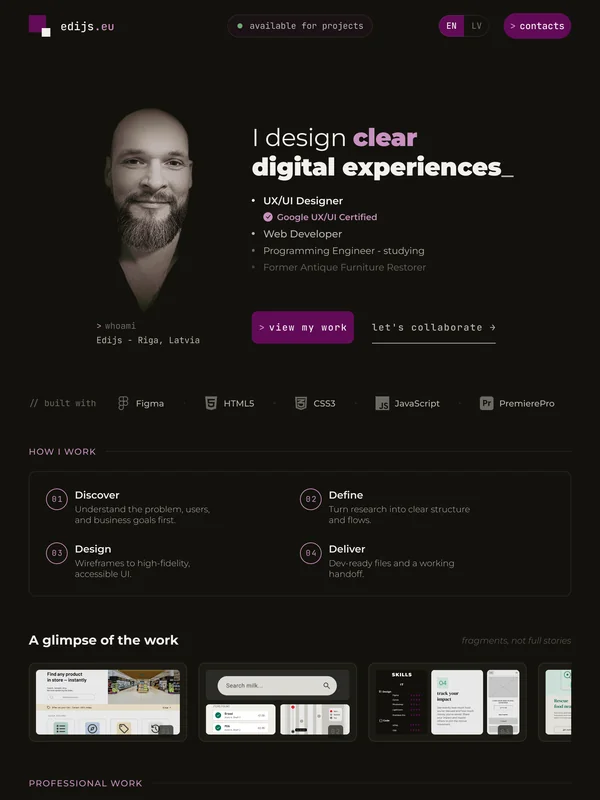
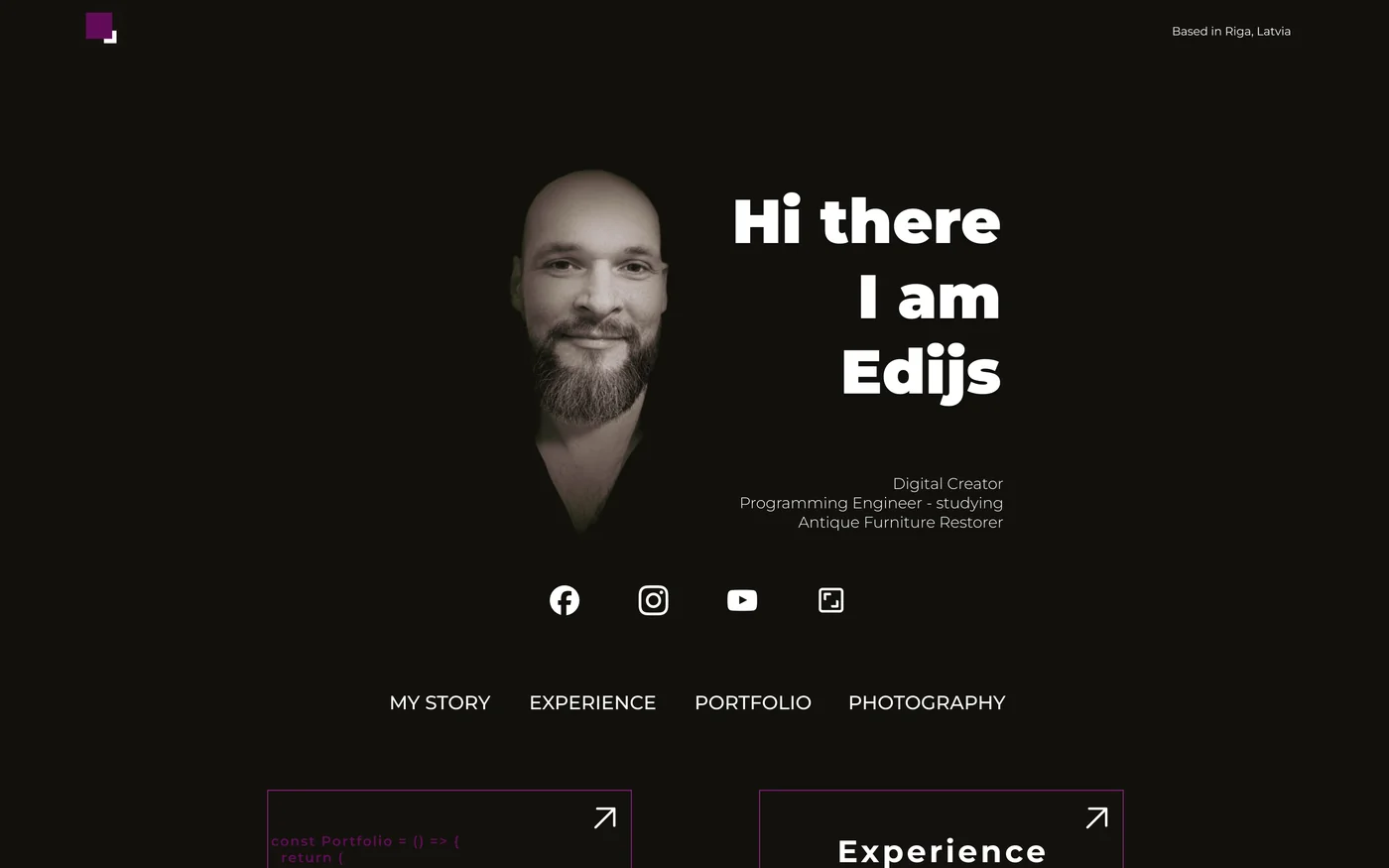
BEFORE / 2025
// before - a page about me: a name, a face and links to social accounts
AFTER / 2026
// after - a page for the reader: what I do, whether I am available, and what to do next
The old stylesheet compared with the rebuilt one, counted across the whole site
Counted across the whole stylesheet
Old
Rebuild
Design tokens defined in one place
3
44
References to those tokens
6
913
Loose hex values outside the token block
56
7
Rules forced with !important
8
3
Reduced-motion blocks
0
7
Keyboard focus rules
0
9
Places the focus outline was switched off
5
0
Two notes. All three remaining !important declarations sit inside the reduced-motion block, where overriding everything is the point. And the old site was not careless work: it already used fluid ranges in forty-five places, just without a system holding them together. The difference the table measures is not effort, it is where the decisions live.
DESIGNED IN FIGMA FIRST
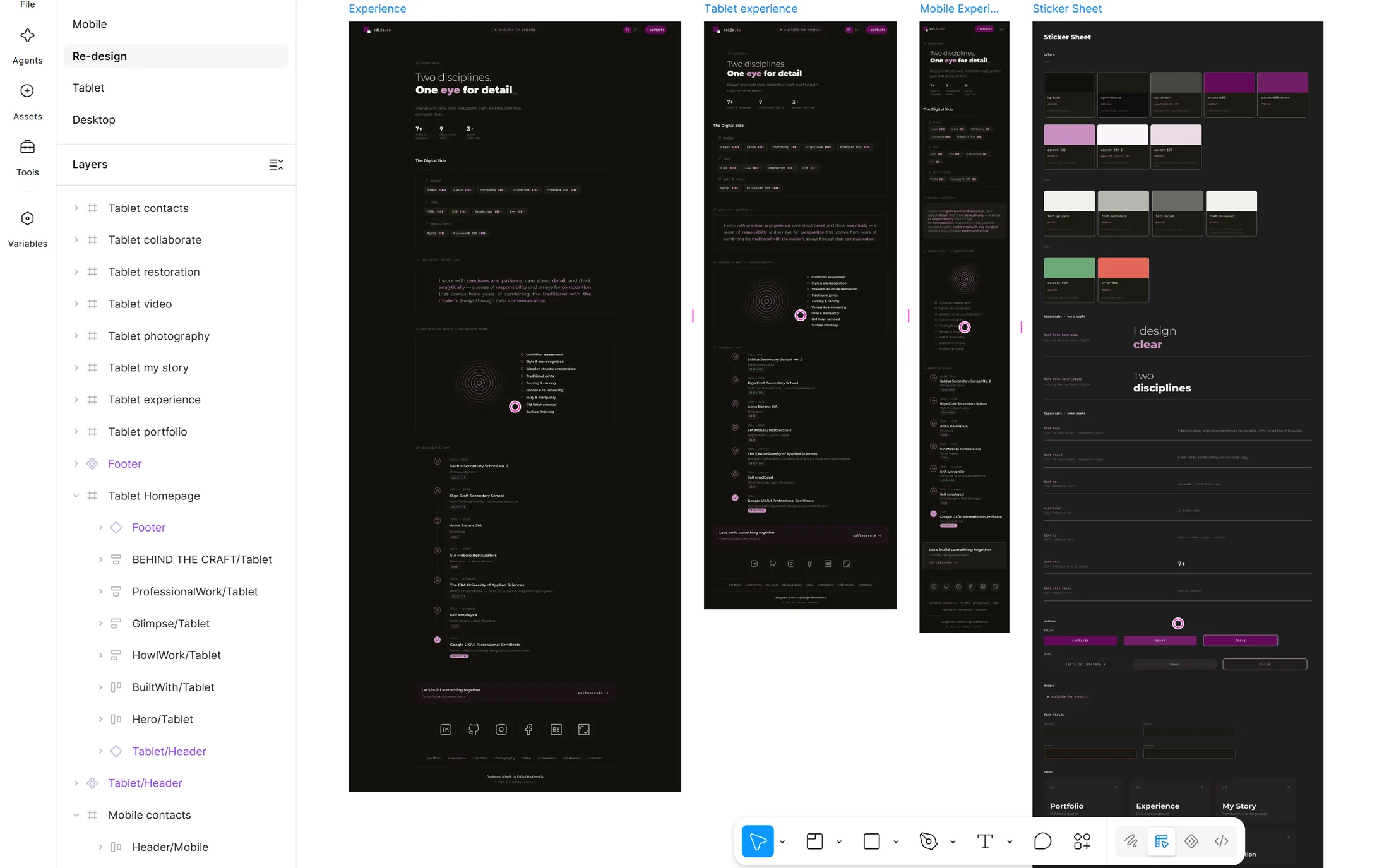
Every page of this site was drawn in Figma before the first line of code. Not a couple of showcase shots, but all of it - at 1440, 834 and 390 pixels, with the components and states that hold it together.
>
A token sheet before any screen. Colour, type scale, radii and durations got their names first. So the screens were assembled from a ready vocabulary, not drawn freehand and reconciled later.
>
A dedicated page for button states. Default, hover, focus and disabled - drawn, not assumed. The state tokens in the stylesheet are lifted straight from it, including the focus ring at two pixels with a two-pixel offset.
>
Both languages in the same frames. Latvian was not left as a translation task at the end. Drawing it early is what exposed the labels that would not fit, and several were shortened in Latvian rather than translated literally.
>
Annotated as if handing it to someone else. Then the someone else turned out to be me - and that is what taught the most: what survived the handoff, and what did not.
FIGMA
// the working file - one page at three widths, beside the sheet of tokens and button states
HOW THE DECISIONS WERE MADE
I did not run a usability study on this project - there were no five participants and no moderated sessions. Inventing them would undermine exactly what this site sets out to prove. What follows is what actually informed the decisions.
>
Two audiences, both real. A recruiter who gives the page around thirty seconds and needs to know what I do, where I am, and whether I am available now. And a client who wants to see finished work. Those two needs shaped the whole home page, from the status badge in the header down to the four steps below.
>
The limits of the format. A portfolio is usually a gallery, and a gallery shows results well. It does not show process, simply because process needs a different form - text, numbers and examples. This page is an attempt to find that form.
>
I leaned on what is already established. Decisions about hierarchy, contrast, affordance and cognitive load came from "Don't Make Me Think", "The Design of Everyday Things" and "Refactoring UI". Where a guideline had a number attached, I used the number.
>
Informal feedback from several people. Not a study, but useful. Sometimes the sharpest eye is the one seeing it for the first time.
THE SYSTEM
Every colour, spacing step and font size on this site is a named token, defined once at the top of the stylesheet and referenced more than eight hundred times below it.
>
Colour is split by job, not by shade. The purple that fills a button is deliberately not the purple that can carry text. The token comments say so directly, which stops the wrong one being reached for later.
>
One token sets the page margin. It grows with the window, and every section follows it at the same time. So nothing drifts out of line at a width nobody tested - including one that was never drawn in any frame.
>
A system with known exceptions. Five colours in the stylesheet are still written by hand rather than as tokens. I know which ones and where - and while I know, that is debt, not chaos. They are next on the list.
WHERE THE DESIGN MET THE BROWSER
A Figma frame is a fixed width. A browser is every width. Building my own design taught me more about handoff than any checklist, because every gap between the two landed on my desk instead of a developer's. Three of them are below, with the fix.
A footer that broke in a 45-pixel window
IN FIGMA
Eight footer links in one centred row, drawn at 1440px and again at 834px. Both frames fit comfortably, so the row looked finished.
IN THE BROWSER
Just above the tablet breakpoint the tablet spacing switches off and the desktop spacing returns, but the page margin is still at its minimum. The text ran past the divider lines on both sides.
320px1440px
// broken between 835px and ~880px - a window no fixed frame contains
fix: the gap between links became fluid and grows with the viewport. If that is not enough, the row wraps - a safety net.
Latvian is not find-and-replace
IN FIGMA
One set of frames for both languages - only the text differs.
IN THE BROWSER
Latvian words run longer, and tight rows stop holding them. A layout that holds in one language is not verified in the other - only unseen so far.
fix: I now check every breakpoint in both languages and compare text lengths rather than assume them. Several labels I shortened in Latvian instead of translating them literally.
A single underscore that would not stay put
IN FIGMA
Each page heading ends with a blinking terminal cursor, drawn as part of the last word. In a fixed frame it is simply a character sitting where it was placed.
IN THE BROWSER
The cursor was its own inline-block element so it could be animated. But an inline-block box is a legal place for the browser to break a line - and at certain widths the underscore dropped to a line of its own, alone, under the heading it belonged to.
fix: on the eight subpages the cursor is plain inline text - the blink only animates opacity, and inline text cannot be split from the word before it. On the home page the cursor rises with its word, so the box is needed there; instead the whole last line is marked unbreakable. Same symptom, two fixes, because the cause was not the same.
FIGMA / 390
// the original frame
BROWSER / 390
the shipped version, after the fixes
ACCESSIBILITY - THE WCAG 2.2 AA TARGET
This site is measured against WCAG 2.2, Level AA. It was not the last step before launch but a condition on every decision along the way.
>
Contrast is calculated, not eyeballed. Where a label sits over a photograph, there is a dark layer between them. How dark it needs to be is set by the brightest part of the photograph, not by the overall impression - otherwise the label disappears exactly where the photograph is lightest.
>
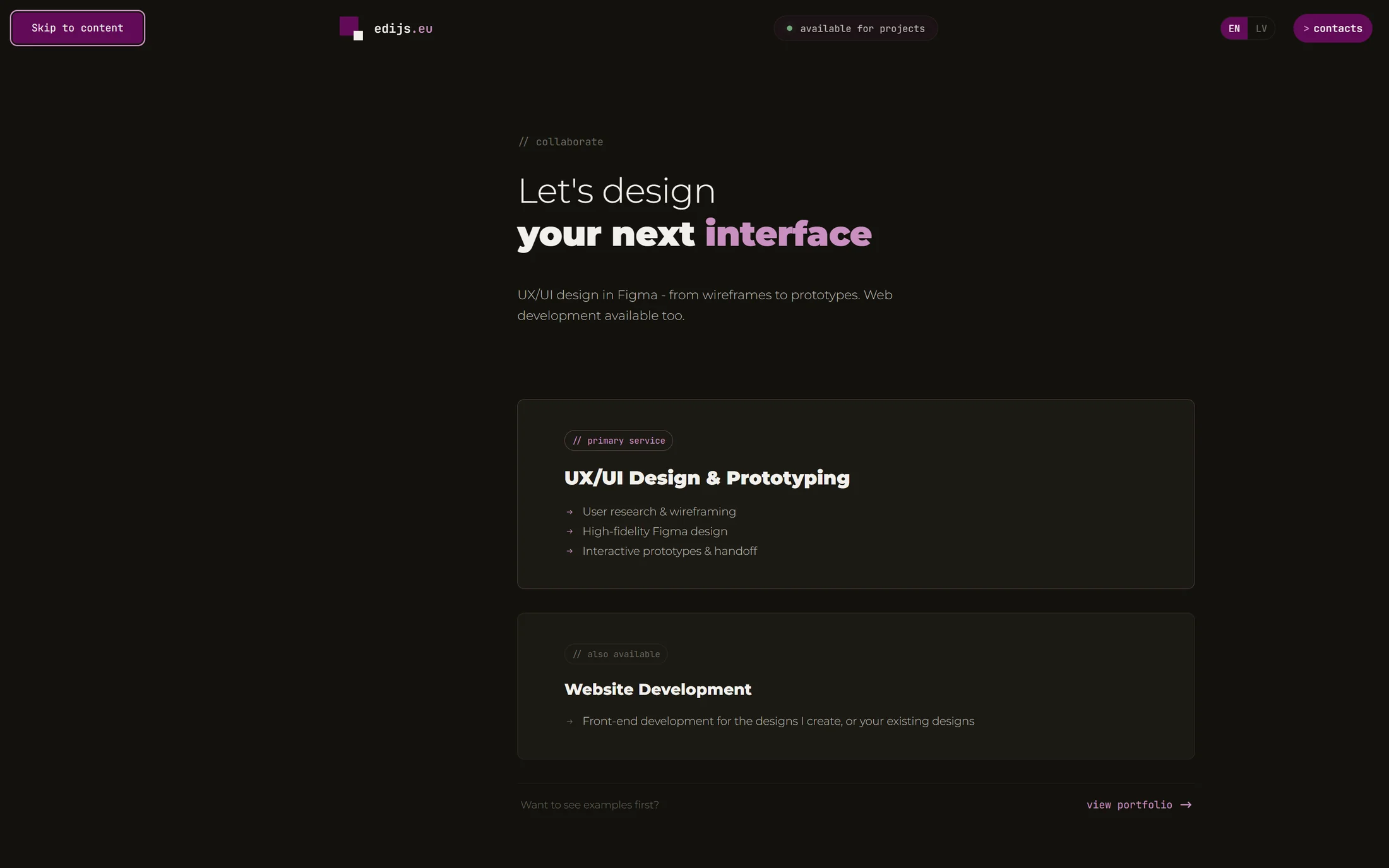
Focus is visible, motion is a choice. The focus ring is a token from the Figma button page, and nine rules in the stylesheet draw it. It is removed nowhere - the old site had five such places. Animation is switched off in five blocks for anyone who has asked their system to reduce motion.
>
The heading outline has no gaps. One h1, one h2 per section, h3 for the cards inside it. Section labels that had been styled paragraphs became real headings, so anyone navigating by heading gets the same structure a sighted visitor sees. Where a section genuinely has no name, none was invented.
>
Dragging is never the only way through. The carousel also moves on buttons, and the video rail can be walked with Tab through the cards. Neither holds the page - when there is nowhere left to go sideways, the page scrolls.
KEYBOARD
// first tab stop - the "Skip to content" link appears, the focus ring is a token
SECURITY - HOW MUCH OF OWASP ACTUALLY APPLIES
A static site has no database, no sessions and no server-side code, so most of the OWASP Top 10 cannot apply to it. Four categories genuinely do apply to a site like this one, and this section is about those.
>
Vulnerable components: nothing to be vulnerable. No framework, no build step, no package manager, no third-party JavaScript. The dependency count is zero, so there is no supply chain that can change underneath this site and no patches to fall behind on.
>
A new tab cannot reach back. Every link that opens in a new tab carries rel="noopener", so the page it opens cannot redirect the tab it came from.
>
Third parties are the real attack surface, so there are almost none. The video section links out instead of embedding a player: no third-party iframe, no cookies set by one, no permissions handed to a frame. What remains is the font provider and the form processor, and both are named rather than left unmentioned.
>
The form holds no secrets. Sending is handled over an encrypted connection by an external service, so the markup anyone can read contains no key, no password and no mail settings. Against bots there is a hidden field: a person never sees it, a bot fills it in, and that message goes no further.
WHAT I TOOK FROM IT
Building what I had drawn changed how I draw. In Figma you decide what a screen looks like. How it behaves between two widths, what it does when the text runs longer, what happens when an image fails - a design file has no answer to those, and the browser answers immediately.
A system does not answer everything. It says what the spacing is and what the colour is, but not whether a section is needed at all. Three times I built something cleanly and then deleted it - the tokens were right, the idea was not.
And the underscore taught the smallest but most useful of the three: the same visual defect on two pages can have two different causes. One fix for both means the second one comes back - later, and on a different page.